Schedule a call!
Most HR teams shopping for talent assessment tools that integrate with ATS already have a working hiring process. What they don’t have is patience for one more system that adds steps instead of removing them. The assessment needs to launch, track, and report from inside the ATS, with results that hold up under scrutiny — not a PDF someone has to dig out of an email thread.
This guide walks through seven ATS-integrated assessment tools, where each one fits, and what to check in a demo before you sign anything.
What “ATS-Integrated” Should Mean for Your Team
Vendors use “ATS-integrated” loosely, and the term covers a wide range of actual behavior. Whether your system is Greenhouse, Workday, iCIMS, or Discovered, the real question is whether an assessment reduces recruiter work or just adds another tab and a weaker report. An applicant tracking system exists to centralize the recruiting lifecycle — posting a role, screening candidates, managing the pipeline. An assessment that pulls any of those steps outside the system undercuts the reason you built that system to begin with.
At minimum, results should land as structured fields on the candidate profile: a score or risk band, invite and status you can track without leaving the ATS, and an audit trail with timestamps and the assessment version. Responsibility for using a selection tool consistently, and for documenting that use, sits with the employer, not the vendor. EEOC guidance on employment tests and selection procedures is explicit about that.
|
Tool |
Best Fit |
Assessment Focus |
Integration Pattern to Verify |
Admin Lift |
|
Criteria HireSelect |
Reliability/safety screening, high-volume frontline roles |
Reliability, safety, cognitive, and skills |
API key + custom field mapping |
Medium |
|
TestGorilla |
Broad screening at scale, frontline/entry-level |
Cognitive ability, basic skills, questionnaires |
Marketplace connector; confirm in-ATS launch |
Medium |
|
Codility |
Technical hiring needing a consistent coding signal |
Coding assessments |
Validate full send/status/result loop |
Medium |
|
CodeSignal |
Scalable, standardized technical screening |
Technical skills assessments |
Native workflow; manual-review step for flagged results |
Medium |
|
Discovered |
Teams that want assessments and ATS native in one platform |
Integrity testing (IntegrityFirst) + broader pre-employment/skills library |
None — native, not third-party |
Low |
|
HackerRank |
Ongoing technical hiring across many reqs |
Standardized technical skills screens |
Confirm scores return as reportable fields |
Medium |
|
Canditech |
Broad integration coverage as the first filter |
General assessment workflows |
Marketplace connector or custom API — confirm which |
Medium-High |
|
Plum |
Role matching + behavioral insight, high-volume hiring |
Match score/fit band plus traits |
Native; match score visible on ATS profile |
Medium |

1. Criteria HireSelect
Criteria HireSelect tends to show up in frontline healthcare and warehouse hiring, where reliability and safety carry as much weight as speed.
- Pairs reliability and safety screens with broader cognitive and skills testing.
- Required setup: Greenhouse’s documentation for one Criteria HireSelect integration calls for a vendor API key and a separate internal key with specific permissions before scores and dispositions map correctly. Budget real time for that step.
- Ask the vendor to demo it live inside your ATS, with results landing on the candidate profile in front of you, not on a slide.
2. TestGorilla
TestGorilla works well for broad screening at scale across frontline and entry-level roles, especially if you’d rather pull several test types from one platform than build a custom library.
- Cognitive ability, basic skills, and role-relevant questionnaires in a single platform.
- “We can send invites” is the baseline in any demo, not the finish line — push for proof of an in-ATS workflow.
- Confirm you can launch from the candidate profile or a stage action, and that scores and bands land on the candidate record instead of an attached file.
3. Codility
Codility is built for technical hiring teams that want a consistent coding signal without turning every screen into an unstructured take-home assignment.
- Purpose-built for software and technical roles, not general screening.
- Validate the full loop inside your ATS: invite send, status tracking, result mapping.
- A workflow that only holds up for one clean candidate tends to break once volume picks up — find that out before a hiring surge, not during one.
4. CodeSignal
CodeSignal fits teams that need a standardized technical screen at scale and can’t have every hiring manager running their own ad hoc evaluation.
- CodeSignal’s documentation of its Workday integration shows results posting to the candidate record automatically, with a flagged result held back until manual scoring is resolved.
- Worth confirming that manual-review behavior for whichever ATS you run, not only Workday.
- Ask specifically how a flagged result behaves — that’s the step most likely to slow recruiters down without anyone realizing why.
5. Discovered
Discovered is the ATS behind IntegrityFirst, and it sidesteps the integration question altogether: the assessments run inside the platform rather than connecting to it from the outside.
- IntegrityFirst integrity testing plus a broader library of pre-employment and skills assessments, native on the same candidate record.
- No API key, field mapping, or vendor coordination to verify before go-live, since there’s nothing external to connect.
- Worth checking that the built-in library actually covers your role types and risk profile before letting native delivery replace a wider comparison.
6. HackerRank
HackerRank fits an ongoing technical hiring program, where you need a repeatable way to screen skills across dozens of requisitions rather than a one-off test for a single role.
- Standardized technical skills screens across many reqs.
- The real value is consistency: a shared standard beats every hiring manager scoring things their own way.
- Confirm scores or bands come back as fields you can report on, not a pass/fail line buried in an email.
7. Canditech
Canditech makes sense if integration coverage is your first filter, since it offers both prebuilt ATS connections and a custom API path.
- Prebuilt connector: follows a known pattern inside a specific ATS marketplace.
- Custom build: new scoping and field mapping, which can stretch your rollout timeline further than expected.
- Ask the vendor to identify which path applies to your ATS, then show you live where status and results land on the candidate record.
8. Plum
Plum fits teams layering role matching and behavioral insight onto high-volume hiring, especially where inconsistency between hiring managers is driving up cost.
- Match score / fit band plus the key behavioral traits a hiring manager actually uses.
- Plum’s own documentation describes recruiters viewing a candidate’s match and experience score directly inside the ATS application, with one click through to deeper detail.
- Hold every other integration to that same standard: a structured score on the candidate record, right where recruiters already are.
Shortlist by Your ATS Workflow

Narrow your shortlist from where recruiters actually work, your ATS stage flow, rather than a feature comparison spreadsheet. If invites and decision-ready results need to sit on the candidate profile with minimal setup, prioritize tools built to run inside the ATS — Criteria HireSelect or TestGorilla, depending on the role type. Screening engineers is its own track: Codility, CodeSignal, and HackerRank all deserve a separate look, with the same requirement that scores map back to fields you can report on.
A redirect flow or a custom API integration can look good enough on paper. Before you accept that, price out the actual workflow cost: who configures it, how long that takes, and what recruiters will actually see in the ATS once it’s live. For a closer look at evaluating integrity-specific assessment vendors as part of this shortlist, see our guide on integrity assessment tools for smart hiring decisions.
Non-Negotiables Before You Sign
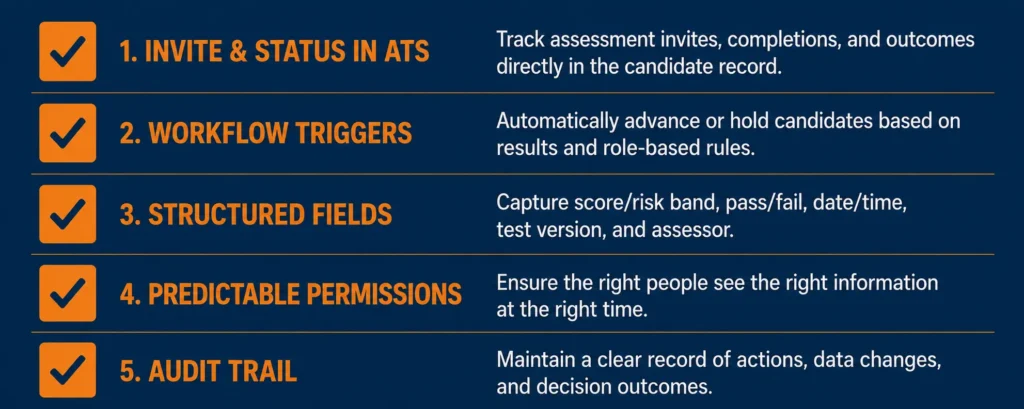
Whichever tool you’re leaning toward, hold it to the same short list:
- Invite and status live in the ATS — you send the assessment from the candidate profile or a stage action, and you see sent, started, completed, and expired without leaving the platform.
- Workflow triggers match how you actually hire. The assessment fires automatically at a defined stage, or reliably when a recruiter acts, so nothing depends on someone remembering during peak requisition load.
- Results map to structured fields, discrete scores and bands on the candidate record, rather than a PDF sitting in an attachment.
- Permissions are predictable. Recruiters and hiring managers each see what they need, and anything sensitive stays gated, which matters more once you’re hiring across locations with different privacy rules.
- There’s a defensible audit trail: timestamps and assessment version, so you can reconstruct what happened, when, and under which criteria, months later if you need to.
If “we’ll just copy the score into a note” is your fallback plan, test that assumption before signing, not six months in. For the online-delivery angle on keeping that record consistent, see our guide on integrity in online assessments.
FAQ
How Much Work Is a “Native ATS Integration,” Really?
More work than flipping a toggle, usually. Expect API keys from the vendor, sometimes from your ATS too, plus field mapping before scores land where recruiters expect them. Ask for a live walkthrough inside your ATS, not a slide deck.
What Data Should Come Back Into the ATS?
At minimum, invite status (sent and completed) plus a structured result, a score or band, on the candidate record. An integration that only attaches a PDF makes consistent stage automation and reporting hard to pull off.
Are These Assessments Still Legally Defensible When They Are Integrated?
Integration helps you prove what happened; it doesn’t make the test itself valid. You still need job-related content and consistent administration, with the ATS record capturing timestamps and the assessment version used.
What Should IT or Security Review Before You Sign?
Ask how the integration authenticates, OAuth or API keys, what candidate data moves between systems, and where results live afterward. A vendor who can’t answer those clearly is handing you risk along with the workflow.
How Fast Can You Roll This Out Without Disrupting the Hiring Team?
Rollout can move fast if the integration supports in-ATS sending, status tracking, and results mapping without custom development. Still build in a pilot stage and a permissions review, and start with one high-volume role to confirm recruiter adoption before you scale it further.