Schedule a call!
A pre-hiring assessment tool can look great in a demo and still fail inside a real recruiting team.
The problem usually shows up in small places. A recruiter has to copy a candidate into another platform. A hiring manager cannot understand the score. A candidate drops off because the assessment feels too long or unclear. HR wants reporting, but the data lives outside the ATS.
That is why choosing 7 easy to integrate pre-hiring assessment tools for HR is not just about comparing features. It is about knowing which tools can survive daily use.
This guide gives HR and talent acquisition leaders a practical checklist: seven criteria every easy-to-integrate assessment tool should pass before it becomes part of your hiring process.
For a vendor-by-vendor comparison, see our guide to Best Easy-to-Integrate Pre-Hiring Assessment Tools Compared. This article focuses on the buying criteria behind the decision.
What Makes a Pre-Hiring Assessment Tool Easy to Integrate?
An easy-to-integrate pre-hiring assessment tool should fit the workflow your recruiting team already uses.
That means the tool should connect cleanly with your ATS or hiring platform, send assessments without manual work, give candidates a simple experience, and return results in a format recruiters can act on.
The ATS should remain the center of the process. Discovered’s guide to what an ATS is explains how applicant tracking systems organize candidate data, hiring stages, communication, and workflow visibility in one place. When assessments sit outside that process, recruiters lose time and HR loses consistency.
The right tool should reduce friction, not add another system people avoid.
Quick Buyer Scorecard
Use this scorecard before adding any assessment platform to your HR tech stack.
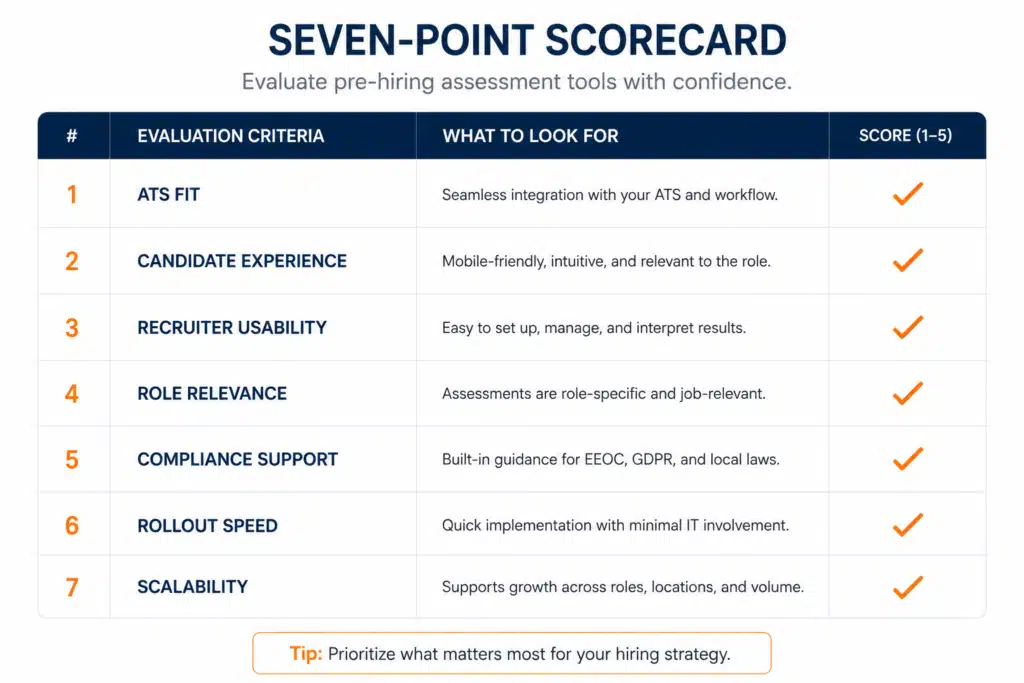
The best tools do not need to win every category equally. They need to match the hiring problem you are trying to solve.
1. ATS Fit: The Tool Should Work Where Recruiters Already Work
The first test is simple: can recruiters use the assessment without leaving the hiring workflow every few minutes?
Strong ATS fit usually includes:
| Feature | Why it matters |
| Assessment trigger | Sends the assessment at the right candidate stage |
| Status visibility | Shows invited, started, completed, or expired |
| Score writeback | Returns the result to the candidate profile |
| Report access | Gives managers detail when needed |
| Workflow rules | Helps move candidates forward, hold for review, or close out |
A tool does not need a complicated integration to be useful. Some teams start with a secure link. Others need native ATS workflow or API support. The right level depends on volume, process maturity, and recruiter workload.
For teams hiring at high volume, the assessment should not depend on recruiter memory. The system should trigger it at the right stage.
2. Candidate Experience: Easy for HR Also Means Easy for Candidates
A tool is not easy to integrate if candidates struggle to complete it.
Before launch, test the assessment from the candidate’s perspective. Open the invitation on a phone. Read the instructions. Check how long it takes. Confirm that the completion message is clear.
A good candidate experience should answer four questions quickly:
What is this assessment?
Why am I being asked to complete it?
How long will it take?
What happens after I finish?
This matters most for frontline, hourly, logistics, retail, staffing, hospitality, healthcare support, and manufacturing roles. Many candidates complete hiring steps on mobile devices, between shifts, or outside office hours.
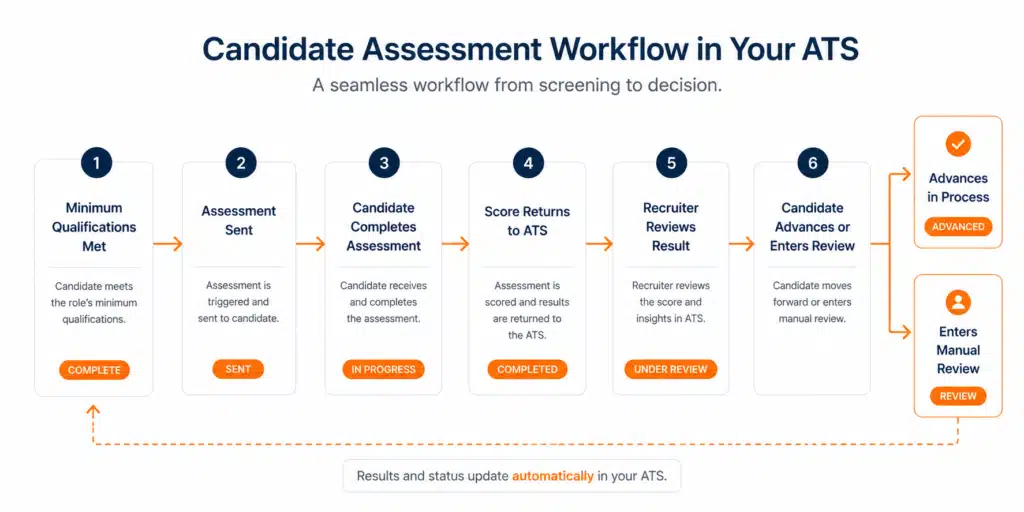
For online screening workflows, see our guide to Online Integrity Assessment Best Practices for HR.
3. Recruiter Usability: The Result Should Tell People What to Do Next
Recruiters do not need another report that takes ten minutes to interpret.
They need a clear result, tied to an approved next step.
A practical result structure might look like this:
| Result | Meaning | Recruiter action |
| Qualified | Candidate meets the assessment threshold | Move forward |
| Review | Candidate needs a secondary review | Apply review criteria |
| Not qualified | Candidate does not meet the threshold | Follow approved disposition process |
| Incomplete | Candidate did not finish | Send reminder or close after deadline |
That does not mean every assessment should automatically reject candidates. For many roles, “Review” is the safest and most useful middle category.
The point is consistency. Recruiters should not have to create their own interpretation rules every time a score appears.
4. Role Relevance: The Assessment Should Match the Job
One reason assessment projects fail is that HR buys a broad platform and then applies the same test to every role.
That rarely works.
A warehouse associate, customer service representative, healthcare aide, sales rep, developer, and supervisor all carry different hiring risks. They also require different evidence before moving forward.
| Role type | Better assessment fit |
| Frontline or hourly | Integrity, reliability, attendance, safety-risk screen |
| Customer service | Situational judgment, communication, dependability |
| Technical roles | Skills test, work sample, coding challenge |
| Sales | Role-play, motivation, communication assessment |
| Supervisors | Judgment, leadership, behavioral assessment |
For roles where turnover, conduct, safety, absenteeism, theft, or reliability are the main concerns, integrity screening is especially relevant. For deeper context, read our guide to How to Select and Validate Integrity Assessment Tools.
5. Compliance Support: Fast Setup Should Not Mean Loose Process

Ease of integration does not replace defensibility.
Employment tests and selection procedures should be job-related, consistently applied, and reviewed for fairness. The EEOC’s employment tests and selection procedures guidance explains that tests can help employers identify qualified applicants, but they can also create legal risk if used in a discriminatory way or if they disproportionately exclude protected groups without proper justification. (Comisión de Igualdad de Oportunidades)
The Uniform Guidelines on Employee Selection Procedures apply to tests and other selection procedures used as the basis for employment decisions, including hiring, promotion, referral, retention, and related decisions. (eCFR)
Before implementation, ask vendors for:
| Documentation | Why HR needs it |
| Validation support | Shows the assessment relates to job outcomes |
| Role-use guidance | Helps avoid applying the tool too broadly |
| Adverse impact review process | Supports fairness monitoring |
| Data security explanation | Protects candidate information |
| Audit trail | Documents who was assessed, when, and what result was used |
| Recruiter training materials | Reduces inconsistent usage |
The U.S. Office of Personnel Management also notes that assessment strategy should begin with a review of critical competencies identified through job analysis. (U.S. Office of Personnel Management)
6. Rollout Speed: The Tool Should Be Easy to Pilot
An assessment tool does not need to be rolled out across the entire company on day one.
The better approach is to pilot it with one role family, one region, or one recruiting team. That gives HR enough signal to fix the workflow before scaling.
A good pilot should track:
- Assessment invitation rate
- Completion rate
- Time to completion
- Recruiter adoption
- Hiring manager feedback
- Pass-through rate
- Time-to-interview
- Time-to-hire
- Override frequency
- Early turnover or incident trends, when relevant
Mini Case Study: Logistics Hiring
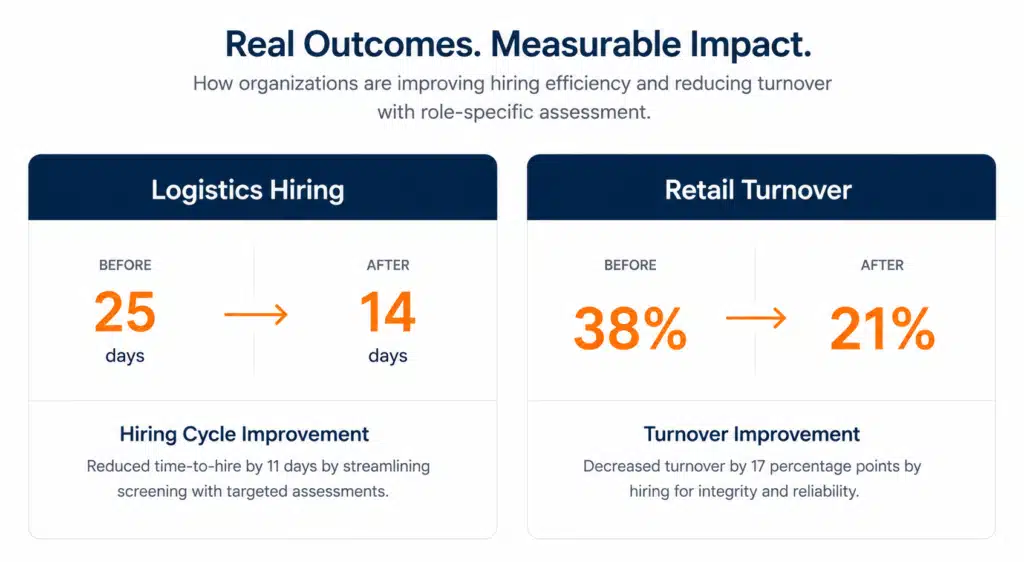
A logistics hiring team was taking about 25 days to move candidates from application to final decision. The issue was not only applicant quality. Recruiters were spending too much time screening candidates who later failed reliability or availability expectations.
By placing a short pre-hiring assessment after minimum qualifications and before recruiter screening, the team reduced manual review and moved qualified candidates forward faster.
The lesson is not that one assessment magically fixes hiring. The lesson is that the right assessment, placed at the right stage, can remove wasted motion from the funnel.
Mini Case Study: Retail Turnover
A retailer was dealing with early turnover across several locations. Hiring managers were interviewing quickly, but candidate quality varied from store to store.
The team introduced a consistent pre-hiring screen for reliability and role fit before manager interviews. Recruiters still made the final decision, but the process became more structured.
The improvement came from consistency: same stage, same assessment, same review rules, same candidate communication.
7. Scalability: The Tool Should Grow With Your Hiring System
The easiest tool today should not become the biggest limitation next year.
Before buying, think about how your hiring process may grow:
- Will more locations use the assessment?
- Will different roles need different assessment types?
- Will hiring managers need scorecards?
- Will recruiters need automated reminders?
- Will leadership want dashboards?
- Will the company eventually need a full ATS or hiring platform?
Some teams only need a secure assessment link. Others need assessment results inside the ATS. Larger or more complex teams may benefit from a full hiring ecosystem with applicant tracking, assessment workflows, scorecards, communication, and automation together.
That is where the connection between IntegrityFirst and Discovered becomes important.
The 7-Point Vendor Conversation HR Should Have
Before signing with any assessment provider, ask these questions in the demo:
- Show us exactly what the candidate receives.
- Show us what the recruiter sees inside the workflow.
- Show us how the result is stored.
- Show us how hiring managers interpret the output.
- Show us how different roles receive different assessments.
- Show us what compliance documentation is available.
- Show us what happens when we scale from one role to ten.
A serious vendor should be able to walk through a real hiring scenario, not only a polished product tour.
Where IntegrityFirst Fits
IntegrityFirst is a strong fit when HR needs a fast, practical way to screen for integrity, reliability, and workplace risk before interviews consume recruiter and manager time.
IntegrityFirst is especially relevant for high-volume and risk-sensitive hiring, including staffing, construction, logistics, healthcare support, manufacturing, retail, hospitality, and transportation.
IntegrityFirst’s public materials state that the assessment takes under 8 minutes, delivers instant results, and can integrate with ATS, VMS, staffing, or hiring platforms depending on the use case. (Integrity First Tests)
That makes it useful when the hiring question is not only “Can this person do the job?” but also “Can we reduce preventable risk before we invest more time in the process?”
FAQ
What are 7 easy to integrate pre-hiring assessment tools for HR?
The phrase refers to pre-hiring assessment tools or tool categories that HR teams can add to their recruiting workflow without creating heavy IT work, candidate drop-off, or recruiter confusion. The best options are ATS-friendly, candidate-friendly, job-related, and easy to pilot.
What makes a pre-hiring assessment tool easy to integrate?
A tool is easy to integrate when recruiters can send assessments, track completion, review results, and document decisions without leaving the hiring workflow or relying on manual spreadsheets.
Do pre-hiring assessment tools need ATS integration?
ATS integration is strongly recommended for high-volume hiring. Smaller teams may start with a secure link, but larger teams usually need assessment status, score writeback, and reporting inside the ATS.
Which pre-hiring assessment is best for frontline hiring?
For frontline roles where reliability, conduct, safety, attendance, theft, or turnover risk matters, integrity and reliability assessments are often a strong fit early in the funnel.
How can HR keep assessment workflows compliant?
HR should use job-related assessments, apply them consistently, document decision rules, monitor outcomes, and review vendor validation materials before launch.
Final Takeaway
The best assessment tool is not always the platform with the longest feature list. It is the one your recruiters will actually use, your candidates can complete without confusion, and your HR team can defend with confidence.
That is the real value of choosing 7 easy to integrate pre-hiring assessment tools for HR with a disciplined checklist. You are not just buying software. You are deciding how candidate data enters the hiring process, how recruiters use it, and how the business reduces avoidable hiring risk.
For employers that need a fast, focused way to screen for integrity, reliability, and workforce risk, IntegrityFirst Tests is built for the pre-interview stage. It helps HR teams identify risk earlier, protect recruiter time, and create a more consistent screening process for high-volume and risk-sensitive roles.
For companies that want assessments inside a broader hiring system, Discovered brings the larger workflow together. Discovered positions itself as AI-powered hiring software with tools for recruiting, assessing, retaining, applicant tracking, workflows, candidate assessments, custom skills tests, scorecards, interview scheduling, and hiring automation. (Discovered.ai)
IntegrityFirst is part of the Discovered hiring ecosystem, which gives employers two practical paths: add a focused integrity assessment to the hiring process now, or build a more complete performance hiring workflow through Discovered. (Integrity First Tests)
To reduce hiring risk with a fast integrity screen, schedule an IntegrityFirst demo.
To connect ATS, assessments, scorecards, communication, and automation in one hiring platform, book a Discovered demo.