Schedule a call!
When HR teams ask how to implement talent assessment tools in ATS workflows, the real issue is usually simple: recruiters already have too many tabs open.
The assessment tool may be strong. The ATS may be solid. But if recruiters have to copy candidate names into another system, wait for a separate report, forward a PDF, and then update the candidate stage manually, the process will not last. People will work around it.
A good implementation feels different. The assessment appears at the right point in the hiring process. Candidates know exactly what to do. Results return to the applicant tracking system. Recruiters can see the recommendation without hunting for it. Hiring managers get a cleaner shortlist.
That is the goal: not more HR technology, but a hiring workflow that people actually use.
For teams still deciding which platform fits their hiring stack, start with our comparison of 7 best talent assessment tools that integrate with ATS. This guide focuses on what happens after the tool is chosen: implementation.
What an ATS Assessment Workflow Should Actually Do
A talent assessment workflow should help recruiters answer practical questions faster:
- Is this candidate ready for recruiter review?
- Did the candidate complete the assessment?
- What did the result say?
- What is the next approved step?
- Is the decision documented in the ATS?
That matters because the ATS should remain the system of record. A helpful overview of how applicant tracking systems work explains why candidate data, communications, interviews, and screening activity need to live in one organized hiring process.
When assessment results sit outside that process, recruiters lose visibility and HR loses control. When they sync back into the ATS, the assessment becomes part of the hiring rhythm.
1. Start With the Hiring Problem, Not the Tool
Before changing settings in the ATS, name the problem the assessment is supposed to solve.
For example:
|
Hiring problem | Assessment use case |
|
Too many weak-fit candidates reach recruiters |
Early screening before recruiter review |
|
High turnover in frontline roles | Integrity, reliability, or work-style assessment |
|
Hiring managers want stronger evidence |
Skills test or work sample before interview |
Candidate evaluation varies by location |
Standardized assessment stage and score rules |
|
Compliance documentation is inconsistent | ATS-based recordkeeping and audit trail |
This step prevents a common mistake: adding the same test to every job because it is easy to configure.
A warehouse role, a sales role, a customer service role, and a supervisor role do not need the same assessment experience. The workflow should reflect the job.
For roles where reliability, safety, conduct, or turnover risk are major concerns, an integrity-focused assessment may fit earlier in the funnel. For more detail on that category, see our integrity assessment guide for hiring.
2. Choose the Right Stage in the ATS
The best assessment stage depends on volume, role type, candidate availability, and recruiter capacity.
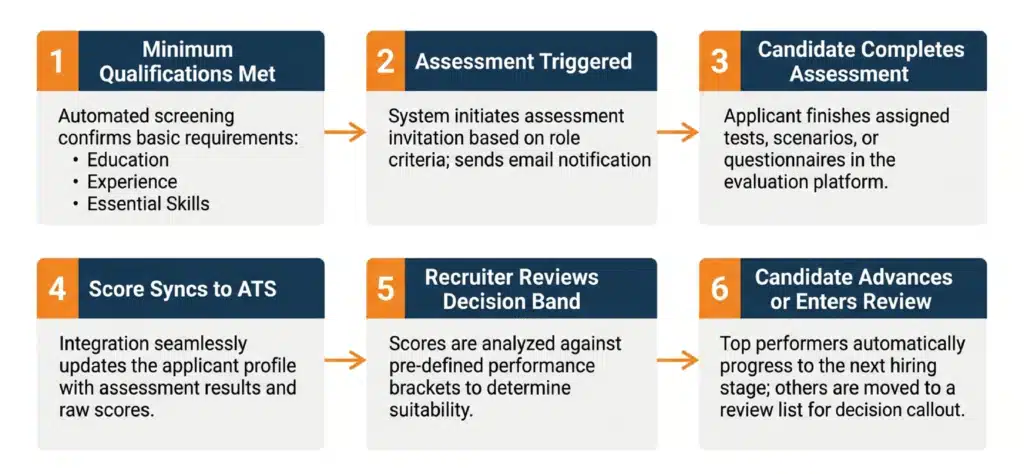
For high-volume roles, the assessment usually belongs after minimum qualifications and before recruiter screening. That keeps recruiters from spending time on candidates who are unlikely to move forward.
For technical or professional roles, the assessment may happen after an initial screen, especially if the task requires more time from the candidate.
For leadership roles, deeper behavioral or psychometric assessments often work better later in the process, when the candidate pool is smaller and the organization is ready to interpret the results carefully.
A simple placement model looks like this:
|
ATS stage |
Best use |
|
Application received |
Knockout questions or minimum requirements |
|
Minimum qualifications met |
Integrity, reliability, or basic screening assessment |
|
Before recruiter screen |
High-volume candidate assessment |
|
Before manager interview |
Skills test, work sample, or role-specific assessment |
|
Finalist stage |
Leadership, personality, or deeper psychometric assessment |
The earlier the assessment sits, the shorter and clearer it should be.
3. Set Clear Trigger Rules
This is where implementation becomes real.
A weak rule sounds like this:
“Recruiters can send the assessment when they think it is useful.”
That leaves room for inconsistency.
A better rule sounds like this:
“Send the IntegrityFirst assessment automatically when a candidate for warehouse, retail, logistics, or staffing roles moves to Minimum Qualifications Met.”
The trigger rule should answer:
- Who receives the assessment?
- Which ATS stage sends it?
- Is the invitation automatic or recruiter-controlled?
- How many reminders are sent?
- How long does the candidate have to complete it?
- What happens if the candidate does not complete it?
- What result moves the candidate forward, holds for review, or stops the process?
Recruiters should not have to remember the workflow. The ATS should carry the workflow.
4. Keep the Candidate Message Plain
Candidate communication is one of the most overlooked parts of implementation.
A confusing assessment invite can hurt completion rates. A message that sounds cold or suspicious can make the company look less trustworthy.
Use plain language:
“Please complete this short pre-employment assessment as the next step in your application. It helps us evaluate candidates consistently for this role and can be completed from any device.”
That is enough. The message explains what it is, why it exists, and what the candidate needs to do.
Avoid phrases that make the assessment sound like a trap, a personality judgment, or a background investigation. The tone should be professional, neutral, and easy to understand.
If the workflow is remote or online-first, our guide to online integrity assessments for hiring covers additional considerations around candidate access, administration, and process consistency.
5. Decide What Data Syncs Back to the ATS

“ATS integration” can mean many things. Some tools only send a link. Others sync status, scores, reports, and recommendations directly into the candidate profile.
Before launch, define exactly what recruiters need to see.
At minimum, the ATS should show:
|
Field |
Why it matters |
|
Assessment status |
Shows invited, started, completed, or expired |
|
Completion date |
Confirms timing and audit history |
|
Overall score or band |
Gives recruiters a clear signal |
|
Recommendation |
Helps standardize next steps |
|
Report link |
Gives access to detail when needed |
|
Assessment version |
Supports documentation |
|
Requisition or role family |
Keeps results tied to the right job |
|
Override reason |
Documents exceptions |
Do not overload recruiters with data they will not use. The best setup gives enough information to make the next step clear.
6. Turn Scores Into Recruiter Actions
A score is only useful if the hiring team knows what to do with it.
Instead of dropping a report into the ATS and expecting recruiters to interpret everything, create simple decision bands:
|
Result |
ATS action |
Recruiter action |
|
Qualified |
Move forward |
Continue to recruiter screen |
|
Review |
Hold |
Apply secondary review criteria |
|
Not qualified |
Stop or disposition |
Follow approved process |
|
Incomplete |
Reminder or expiration |
Re-engage or close after deadline |
This does not mean every assessment should automatically reject candidates. In many workflows, the right move is structured review, especially for borderline results.
The important part is consistency. Similar candidates applying for similar roles should move through the same process.
The EEOC’s employment tests and selection procedures guidance explains that employment tests can be effective, but they can raise legal issues if used in a discriminatory way or if they disproportionately exclude protected groups without proper justification.
7. Build Compliance Into the Workflow
Compliance should not be a cleanup step after launch. It should be part of the workflow design.
Before going live, HR should confirm:
- The assessment is job-related for the role.
- The same process applies to similarly situated candidates.
- Decision rules are documented.
- Recruiters understand how to use the results.
- Overrides require a written reason.
- Assessment data is stored in the ATS or approved system.
- Results are reviewed periodically for fairness and business impact.
The Uniform Guidelines on Employee Selection Procedures apply to tests and other selection procedures used as the basis for employment decisions, including hiring, promotion, referral, retention, and related decisions. (Federal Registry)
The U.S. Office of Personnel Management also emphasizes that effective personnel assessment starts with valid, current job analysis before selecting or designing an assessment strategy. (U.S. Office of Personnel Management)
That is the mindset to bring into ATS implementation: start with the job, then configure the tool.
8. Pilot Before You Roll It Out Everywhere

A small pilot will reveal problems faster than a large rollout.
Choose one job family, one location group, or one recruiter team. Run the workflow long enough to see whether candidates complete the assessment, recruiters trust the result, and hiring managers understand the output.
Track:
- Assessment invitation rate
- Completion rate
- Time to completion
- Score writeback reliability
- Recruiter adoption
- Candidate pass-through rate
- Time-to-interview
- Time-to-hire
- Early turnover
- Override frequency
- Adverse impact review cadence
- If recruiters are still opening another system to check results, fix the sync.
- If candidates are dropping off, fix the message or placement.
- If hiring managers ignore the results, simplify the scorecard.
- If too many overrides happen, revisit the decision rules.
Implementation is not done when the integration turns on. It is done when the workflow holds up in real hiring conditions.
Where IntegrityFirst Fits in the ATS Workflow
Not every assessment platform solves the same problem.
|
Tool type |
Best use |
Best ATS stage |
|
IntegrityFirst |
Integrity, reliability, conduct, and workforce risk screening |
Early screen before recruiter review |
|
Skills assessment tools |
Work samples, coding tests, task-based evaluations |
Before manager or technical interview |
|
Psychometric tools |
Personality, leadership, and deeper behavioral insight |
Finalist or leadership stage |
IntegrityFirst is a strong fit when the hiring issue is not just “Can this person do the task?” but “Can we reduce avoidable hiring risk before managers spend time interviewing?”
That makes it especially relevant for frontline, hourly, logistics, retail, staffing, healthcare support, and other roles where reliability and workplace conduct have direct business impact.
For broader vendor selection criteria, see our guide to top talent assessment tools that integrate with ATS.
Common Implementation Mistakes
The most common mistake is treating implementation like a technical connection only.
Yes, the systems need to talk. But the bigger questions are operational:
- Where does the assessment belong?
- Who owns exceptions?
- What does the recruiter see?
- What does the candidate experience?
- What will leadership measure after launch?
Other mistakes include sending assessments too late, asking candidates to complete long tests too early, failing to train recruiters, giving hiring managers reports they do not understand, and measuring activity instead of outcomes.
A good ATS assessment workflow should make hiring simpler, not more complicated.
FAQ
What is the best way to implement talent assessment tools in ATS workflows?
The best way to implement talent assessment tools in ATS workflows is to define the hiring problem, place the assessment at the right ATS stage, set clear trigger rules, sync results back to the candidate profile, train recruiters, pilot the process, and measure outcomes before scaling.
Should assessment results automatically reject candidates?
Not always. Some workflows use automatic disposition for clear minimum requirements, but many assessment results should trigger a structured review. The key is to document the rule and apply it consistently.
What assessment data should sync back to the ATS?
Assessment status, completion date, score or decision band, recommendation, report link, assessment version, requisition, role family, and override reason are the most useful fields to sync.
Where should integrity assessments sit in the hiring workflow?
For high-volume or frontline hiring, integrity assessments often work best after minimum qualifications and before recruiter screening. That helps teams reduce avoidable risk before investing interview time.
Final Takeaway
The best ATS assessment workflow does not feel like another system. It feels like a cleaner hiring process.
For companies that need to identify integrity, reliability, and workplace risk earlier in the funnel, IntegrityFirst Tests gives hiring teams a fast, candidate-friendly way to screen before interviews take up recruiter and manager time. It is especially useful for high-volume, frontline, staffing, construction, healthcare, logistics, retail, hospitality, and manufacturing roles where one poor hire can create real operational cost.
And because IntegrityFirst is part of the broader Discovered Performance Hiring Software ecosystem, teams can connect integrity screening with the rest of the hiring process: applicant tracking, assessments, candidate workflows, scorecards, communication, and recruiting automation. Instead of adding another isolated vendor, employers can build a more complete hiring workflow around better data and faster decisions.
If your team is ready to reduce hiring risk, improve recruiter efficiency, and bring assessment results into a more structured ATS workflow, contact IntegrityFirst Tests or book a Discovered demo to see how the full hiring ecosystem can support your process from candidate screening to final decision.