Schedule a call!
Most HR teams do not start looking for assessment software because they want another dashboard. They start because something in the hiring process is getting expensive: too many weak-fit candidates reaching managers, early turnover, unreliable attendance, safety incidents, inconsistent screening, or recruiters spending hours on work the ATS should already handle.
That is why how to choose top talent assessment tools for HR is less about finding the platform with the longest feature list and more about choosing the tool that solves the right hiring problem.
A technical skills platform may be perfect for engineering roles and almost useless for frontline risk screening. A leadership psychometric tool may be valuable for succession planning but too heavy for high-volume hourly hiring. An integrity assessment may be exactly right when the issue is reliability, conduct, theft, absenteeism, or workplace risk.
The best choice is the one your recruiters will actually use, your candidates can complete without confusion, and your HR team can defend with clear documentation.
If you are comparing named vendors, start with our guide to the 7 best talent assessment tools that integrate with ATS. This article focuses on the buyer’s decision: how to evaluate the options before you commit.
What “Top” Really Means in Talent Assessment Tools
A top talent assessment tool is not automatically the most popular, the most expensive, or the one with the most test types.
For HR, “top” should mean five things:
| Evaluation area | What HR should look for |
| Job relevance | The assessment measures traits, skills, or risks tied to the role |
| Predictive value | Scores help forecast performance, reliability, or risk more accurately than guesswork |
| Workflow fit | Recruiters can use the tool inside or alongside the ATS without extra admin work |
| Candidate experience | The process is clear, mobile-friendly, and reasonable for the stage of hiring |
| Compliance support | The vendor can explain validation, adverse impact review, data security, and documentation |
The U.S. Office of Personnel Management notes that effective assessment starts with job analysis, which connects job duties and competencies to the assessment process. That is a useful standard for any HR buyer, not only federal hiring teams. Read the OPM assessment and selection guidance before finalizing your evaluation criteria.
How to Choose Top Talent Assessment Tools for HR: 7 Practical Checks
Use these seven checks as a scorecard during demos, RFPs, and vendor shortlists.
1. Start With the Hiring Risk You Need to Reduce

Do not ask, “Which assessment platform has the most features?” Ask, “What are we trying to prevent or improve?”
For example:
| Hiring issue | Better assessment fit |
| High early turnover | Integrity, reliability, motivation, or work-style assessment |
| Poor technical quality | Skills test, work sample, or job simulation |
| Inconsistent interview decisions | Structured interview scorecards |
| Leadership misalignment | Leadership, judgment, or behavioral assessment |
| Safety, theft, absenteeism, or conduct concerns | Integrity and risk-focused assessment |
When the business problem is clear, the vendor conversation changes. You are no longer impressed by every feature. You are looking for proof that the tool fits your hiring reality.
For roles where integrity, reliability, or workforce risk are the main concerns, see our integrity assessment guide for smart hiring.
2. Match the Assessment Type to the Role
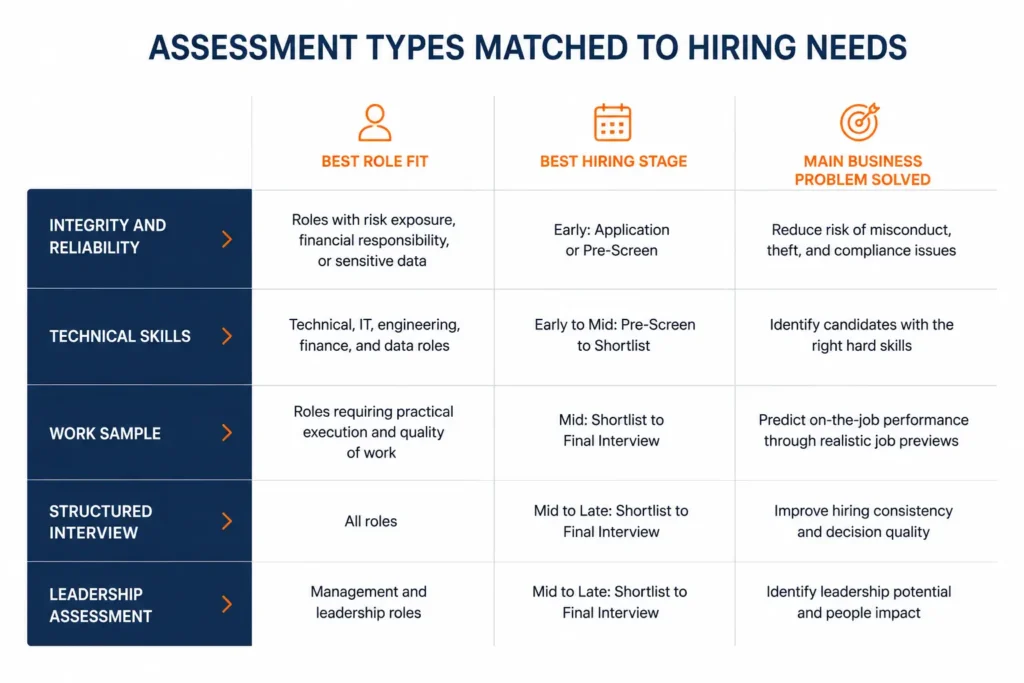
A common mistake is using one assessment across every role because it is easy to administer. That may keep implementation simple, but it can weaken job relevance.
Hourly and frontline roles often need fast, practical screening for reliability, work ethic, safety orientation, and integrity risk. Customer-facing roles may need communication, judgment, and dependability signals. Technical roles need work samples or skills tests. Supervisory roles may need decision-making, leadership behavior, and conflict management insight.
The tool should reflect the job, not just the HR tech stack.
The EEOC explains that employers use many types of employment tests, including cognitive tests, work samples, personality tests, and integrity tests, but those tools can raise legal issues if they are used in discriminatory ways or disproportionately exclude protected groups without justification. See the EEOC guidance on employment tests and selection procedures.
3. Ask for Validity Evidence You Can Understand
A vendor should be able to explain what the assessment measures, how scores should be interpreted, and what evidence supports its use.
You do not need a statistics lecture in every demo, but you do need clear answers:
What job-related traits or skills does the assessment measure?
What outcomes is it designed to predict?
Is there validation evidence for similar roles or use cases?
How should cutoff scores or decision bands be used?
How often should the process be reviewed?
What documentation is available for HR, legal, or compliance teams?
Be cautious when a vendor relies only on vague claims like “AI-powered,” “scientifically proven,” or “built by experts.” Those phrases do not replace evidence.
The Uniform Guidelines on Employee Selection Procedures apply to tests and other selection procedures used as a basis for employment decisions. That is why validity, documentation, and consistent use belong in the buying process from the start.
4. Test the Recruiter Workflow, Not Just the Demo
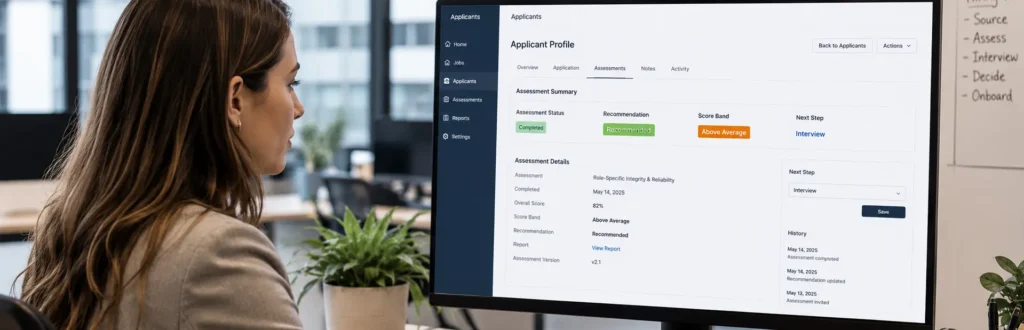
A polished demo does not always show daily recruiter life.
During vendor evaluation, ask to see the workflow from the recruiter’s point of view:
How is the assessment invitation sent?
Can it be triggered from the ATS?
Where does the score appear?
Does the recruiter need to log into another platform?
Can hiring managers see a simple recommendation?
Are results searchable and auditable later?
If the recruiter still has to copy names, download reports, and manually update candidate stages, the tool may create more work than it removes.
For implementation planning after selection, use our guide on how to implement talent assessment tools in ATS workflows.
5. Protect the Candidate Experience
A candidate does not care how sophisticated your assessment platform is. They care whether the process is clear, fair, and easy enough to complete.
Before choosing a vendor, complete the assessment yourself on a phone. Read the invitation email. Check the instructions. Time the process. Look at the completion confirmation.
For early-stage hiring, shorter assessments usually perform better. A long work sample may be appropriate later in the funnel, but it can hurt completion rates if sent to every applicant too early.
Good candidate experience also supports employer brand. The invitation should explain what the assessment is, why it is part of the process, and what the candidate should expect next.
6. Compare Reporting for HR Leaders, Not Only Recruiters
Recruiters need candidate-level recommendations. HR leaders need trend-level insight.
A strong tool should help answer questions such as:
Which roles have the highest completion rates?
Where are candidates dropping out?
Do scores correlate with interview pass-through, early turnover, or safety outcomes?
Are decision bands being used consistently?
Are overrides documented?
Is there a regular adverse impact review cadence?
For broader HR technology fit, the Discovered.ai employee assessment software overview highlights the importance of using assessments with ATS and hiring workflows rather than keeping them isolated.
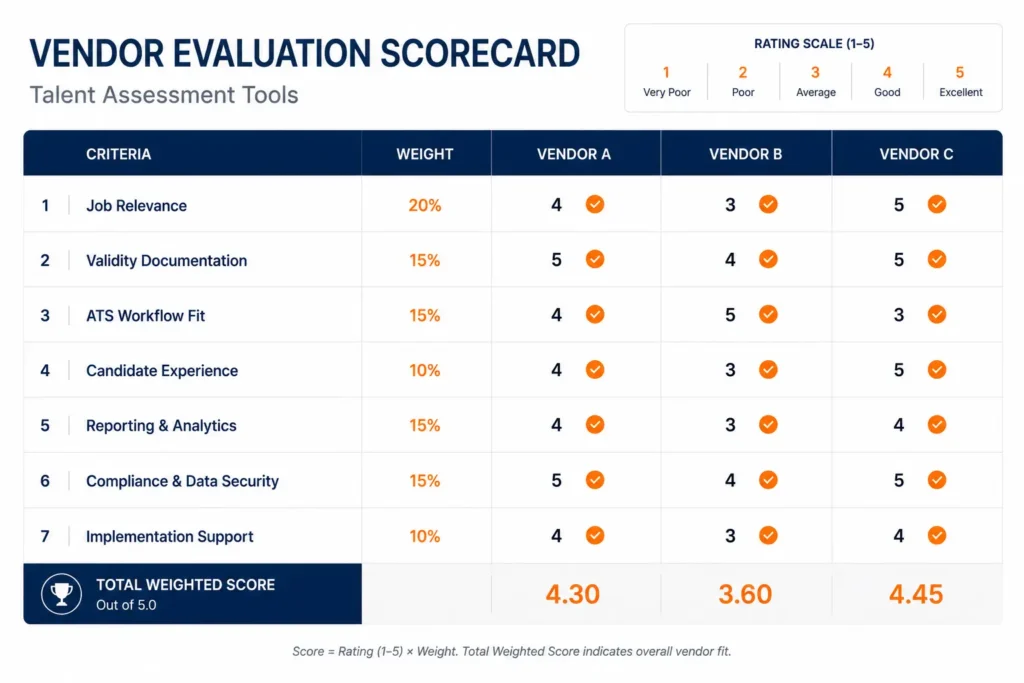
7. Build a Vendor Scorecard Before the Final Decision
When every vendor demo sounds convincing, a simple scorecard keeps the team honest.
Use a 1–5 score for each category:
| Criteria | Weight | Score |
| Job relevance by role family | 20% | |
| Validity and documentation | 20% | |
| ATS and workflow fit | 15% | |
| Candidate experience | 15% | |
| Reporting and analytics | 10% | |
| Compliance and data security | 10% | |
| Implementation effort and support | 10% |
The weighting matters. A tool with a beautiful interface but weak job relevance should not win. A tool with strong science but poor recruiter adoption will also struggle.
The best decision usually comes from balancing evidence, usability, and business fit.
Example: ACME’s Vendor Evaluation
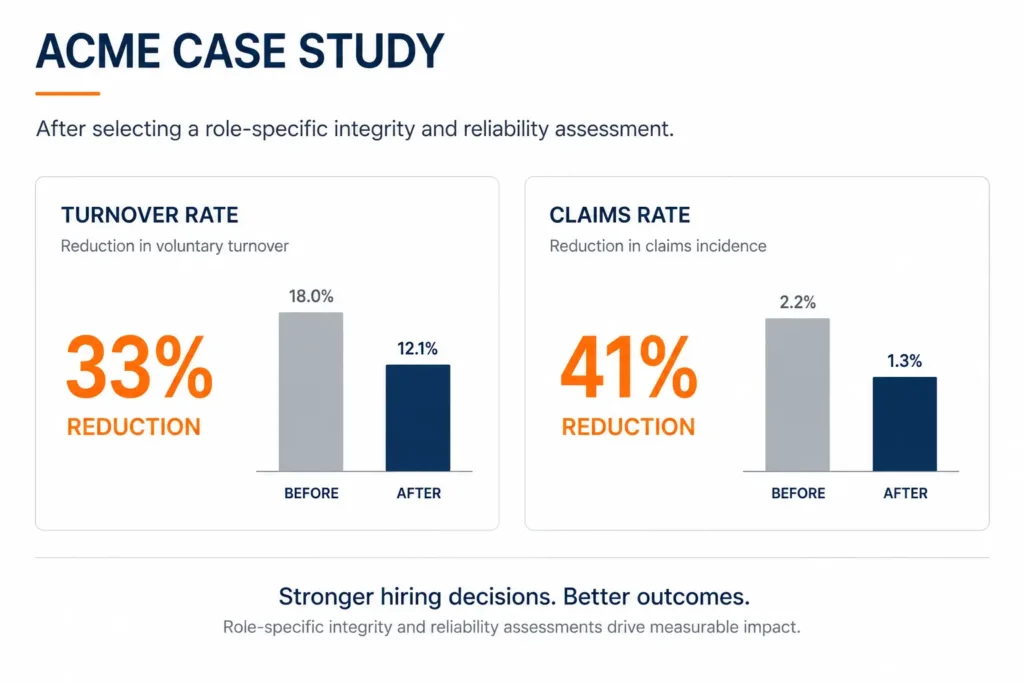
ACME had a common problem: frontline hiring looked efficient on paper, but managers kept seeing preventable issues after hire. Early turnover was high, workers’ comp claims were rising, and recruiters were spending too much time moving candidates through a process that did not separate reliable applicants from risky ones early enough.
Instead of buying the broadest talent platform, ACME narrowed the decision to three questions:
Will this tool help us identify reliability and integrity risk before the interview?
Can recruiters use it without leaving the hiring workflow?
Can HR document the process clearly enough for compliance review?
After replacing a generic assessment step with a role-specific integrity and reliability screen, ACME’s case study showed a 33% reduction in turnover and a 41% reduction in claims.
The lesson is not that every company will see the same numbers. The lesson is that the right tool should be chosen against a specific business problem, then measured after launch.
For teams focused on retention and workforce risk, read more about integrity assessments for reducing turnover.
Final Buyer Checklist
Before signing with a vendor, confirm that you can answer yes to these questions:
Is the assessment clearly tied to the job?
Does the vendor provide understandable validity documentation?
Can the tool fit the ATS workflow your recruiters already use?
Is the candidate experience reasonable for the hiring stage?
Are decision bands and recruiter actions clear?
Can HR review outcomes, overrides, and adverse impact?
Does the tool solve the original business problem?
If the answer is no, keep evaluating.
Final Takeaway
Learning how to choose top talent assessment tools for HR is not about finding a universal “best” platform. It is about choosing the tool that fits the role, the workflow, the candidate experience, and the business risk you need to reduce.
For some companies, that means a technical skills platform. For others, it means structured interviews, leadership assessments, or work samples. For organizations hiring into roles where reliability, conduct, safety, and workforce risk matter, IntegrityFirst can be the practical first screen that helps recruiters focus on better-fit candidates earlier.
If your team wants a clearer way to evaluate integrity, reliability, and risk before the interview, contact IntegrityFirst Tests to see how the assessment fits your hiring process.